
How to Use the ‘Aurora Augmented’ App: A Beginner’s Guide
A step-by-step guide on downloading, setting up, and using the key features of the Aurora Augmented app. Include screenshots or descriptions of the AR features, trail maps, and how to access event information.
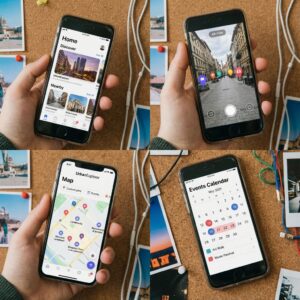
Welcome to Aurora’s digital layer! Our free Aurora Augmented app is your gateway to experiencing downtown in entirely new ways. Here’s everything you need to get started:
Getting Started:
-
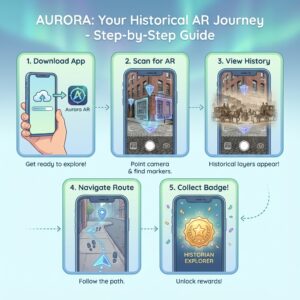
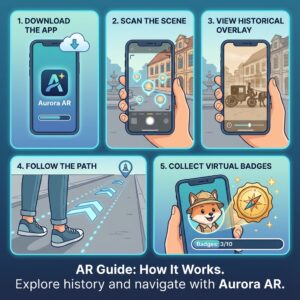
Download from Apple App Store or Google Play
-
Allow camera and location permissions (we respect your privacy – see our data policy)
-
Create a free account or explore as a guest
Core Features:
🎯 AR Trails & Tours
-
Point your camera at any historic building with the AR marker
-
Follow the glowing digital path for guided experiences
-
Collect virtual badges at each landmark
🗺️ Live Wayfinding
-
See directional arrows overlaid on real streets
-
Filter routes by accessibility needs or points of interest
-
Find real-time parking availability visualized through AR
🏛️ Digital Landmarks
-
Tap floating icons to reveal building histories
-
Watch “time-lapse” AR showing architectural changes
-
Listen to narrated stories at your own pace
📅 Event Integration
-
Point your camera at event posters for instant calendar adds
-
See virtual crowd flow predictions during festivals
-
Access AR-exclusive content at participating venues
Pro Tip: Enable “Discovery Mode” to stumble upon hidden AR art installations and secret historical anecdotes!
 Previous Post